'Code'에 해당되는 글 161건
-
!['[Python] 비지도 학습 - 군집분석' 포스트 대표 이미지](https://img1.daumcdn.net/thumb/R750x0/?scode=mtistory2&fname=https%3A%2F%2Fblog.kakaocdn.net%2Fdna%2Fl3hhG%2Fbtqx2UNgIb0%2FAAAAAAAAAAAAAAAAAAAAAO0Z1evZ-K47K_4TzxctP744_QF5xHgFy5kA8J4hypIy%2Fimg.png%3Fcredential%3DyqXZFxpELC7KVnFOS48ylbz2pIh7yKj8%26expires%3D1772290799%26allow_ip%3D%26allow_referer%3D%26signature%3DiummzTW7U0XdBQ85C%252FbCYQKqnu0%253D) [Python] 비지도 학습 - 군집분석2019.09.04
[Python] 비지도 학습 - 군집분석2019.09.04 -
!['[Python] openCV 이용한 얼굴인식' 포스트 대표 이미지](https://img1.daumcdn.net/thumb/R750x0/?scode=mtistory2&fname=https%3A%2F%2Fblog.kakaocdn.net%2Fdna%2FE5AxC%2Fbtqx1yXqvtC%2FAAAAAAAAAAAAAAAAAAAAAJrLqIuSXTPuG6KTL7pcVQ4zVf1DY2jbds2IRQixDPOd%2Fimg.png%3Fcredential%3DyqXZFxpELC7KVnFOS48ylbz2pIh7yKj8%26expires%3D1772290799%26allow_ip%3D%26allow_referer%3D%26signature%3DZEdu6l%252BtC1k4ZUMtM1bx4oOWu%252Bg%253D) [Python] openCV 이용한 얼굴인식2019.09.03
[Python] openCV 이용한 얼굴인식2019.09.03 -
[Python] PCA(주성분 분석)2019.09.03
-
!['[Python] Cross-validation + Grid Search' 포스트 대표 이미지](https://img1.daumcdn.net/thumb/R750x0/?scode=mtistory2&fname=https%3A%2F%2Fblog.kakaocdn.net%2Fdna%2FevOmxj%2FbtqxPSYjsY8%2FAAAAAAAAAAAAAAAAAAAAAHzqbEyFgT-Vbu3jHurLSJGW4M6SxL0ePhRHfT54zx0w%2Fimg.png%3Fcredential%3DyqXZFxpELC7KVnFOS48ylbz2pIh7yKj8%26expires%3D1772290799%26allow_ip%3D%26allow_referer%3D%26signature%3DB3F4DpLR9qpoybsLuH%252FDGHGPELk%253D) [Python] Cross-validation + Grid Search2019.08.30 1
[Python] Cross-validation + Grid Search2019.08.30 1 -
!['[Python] Grid Search' 포스트 대표 이미지](https://img1.daumcdn.net/thumb/R750x0/?scode=mtistory2&fname=https%3A%2F%2Fblog.kakaocdn.net%2Fdna%2FciZ6qg%2FbtqxQoWUMju%2FAAAAAAAAAAAAAAAAAAAAAK_27qVsl9prmmi0Xb26FyLgZmfjF8SbqcHJoFduqIU-%2Fimg.png%3Fcredential%3DyqXZFxpELC7KVnFOS48ylbz2pIh7yKj8%26expires%3D1772290799%26allow_ip%3D%26allow_referer%3D%26signature%3DEvTL9iseYeAOny1UaZZlPat%252BhIc%253D) [Python] Grid Search2019.08.30
[Python] Grid Search2019.08.30 -
!['[Python] Cross-validation(교차검증)' 포스트 대표 이미지](https://img1.daumcdn.net/thumb/R750x0/?scode=mtistory2&fname=https%3A%2F%2Fblog.kakaocdn.net%2Fdna%2Fbs13fy%2FbtqxUKqc7zq%2FAAAAAAAAAAAAAAAAAAAAAPInImmIzGRoFWtWAdeMjpm9d-jKp93U-cL-QdnzjOtk%2Fimg.png%3Fcredential%3DyqXZFxpELC7KVnFOS48ylbz2pIh7yKj8%26expires%3D1772290799%26allow_ip%3D%26allow_referer%3D%26signature%3DENMpMAQbljRVHs%252F2jDGbAc7nT0Y%253D) [Python] Cross-validation(교차검증)2019.08.30 1
[Python] Cross-validation(교차검증)2019.08.30 1 -
!['[Python] 분류분석 - SVM(Support Vector Machine)' 포스트 대표 이미지](https://img1.daumcdn.net/thumb/R750x0/?scode=mtistory2&fname=https%3A%2F%2Fblog.kakaocdn.net%2Fdna%2FbrUgj4%2FbtqxNTQlbco%2FAAAAAAAAAAAAAAAAAAAAALo3P2xZbnPNsjphvs7nckH0lnq7n7fj2-zGsOl9KNxE%2Fimg.png%3Fcredential%3DyqXZFxpELC7KVnFOS48ylbz2pIh7yKj8%26expires%3D1772290799%26allow_ip%3D%26allow_referer%3D%26signature%3DWyzO933Nvjk3p1Y38jfScwMd71A%253D) [Python] 분류분석 - SVM(Support Vector Machine)2019.08.29 1
[Python] 분류분석 - SVM(Support Vector Machine)2019.08.29 1 -
!['[Python] 분류분석 - logistic regression' 포스트 대표 이미지](https://img1.daumcdn.net/thumb/R750x0/?scode=mtistory2&fname=https%3A%2F%2Fblog.kakaocdn.net%2Fdna%2FCfaSN%2FbtqxN5hROB1%2FAAAAAAAAAAAAAAAAAAAAAOI0vtbq0BLE6bqe2vPdK2b7hYTVI7zy-a81_ArWLSCy%2Fimg.png%3Fcredential%3DyqXZFxpELC7KVnFOS48ylbz2pIh7yKj8%26expires%3D1772290799%26allow_ip%3D%26allow_referer%3D%26signature%3DUlJLAjDEbHOIRjeif9kjTq7vRYM%253D) [Python] 분류분석 - logistic regression2019.08.28
[Python] 분류분석 - logistic regression2019.08.28 -
!['[Python] LinearRegression(수치예측) - Lasso' 포스트 대표 이미지](https://img1.daumcdn.net/thumb/R750x0/?scode=mtistory2&fname=https%3A%2F%2Fblog.kakaocdn.net%2Fdna%2FcEaKBt%2FbtqxN5vl5Wb%2FAAAAAAAAAAAAAAAAAAAAAOFlf-WavcT__dJNJbIGCJbCut7KiEQ3SsRyS3_GKktL%2Fimg.png%3Fcredential%3DyqXZFxpELC7KVnFOS48ylbz2pIh7yKj8%26expires%3D1772290799%26allow_ip%3D%26allow_referer%3D%26signature%3Dhuuo12eOip30Bsu2diiVGBRZsUY%253D) [Python] LinearRegression(수치예측) - Lasso2019.08.28
[Python] LinearRegression(수치예측) - Lasso2019.08.28 -
!['[Python] LinearRegression(수치예측) - Ridge' 포스트 대표 이미지](https://img1.daumcdn.net/thumb/R750x0/?scode=mtistory2&fname=https%3A%2F%2Fblog.kakaocdn.net%2Fdna%2FUw99u%2FbtqxQqL3ZX0%2FAAAAAAAAAAAAAAAAAAAAAALdY8i1ogwG2wLYRCuCXWxuxy6SnSe7IAATSZQBeufX%2Fimg.png%3Fcredential%3DyqXZFxpELC7KVnFOS48ylbz2pIh7yKj8%26expires%3D1772290799%26allow_ip%3D%26allow_referer%3D%26signature%3DXvjAHmrhpenQQn7LMg81IjIKJgw%253D) [Python] LinearRegression(수치예측) - Ridge2019.08.28
[Python] LinearRegression(수치예측) - Ridge2019.08.28
[Python] 비지도 학습 - 군집분석
[K-Means Clustering]
* 이 알고리즘은 비지도 학습의 가장 간단하면서 널리 사용하는 군집 기법이다.
[과정]
-
- 데이터의 특정 영역을 대표하는 클러스터 중심(cluster center)를 찾는다.
-
- 데이터 포인트를 가장 가까운 클러스터 중심에 할당하고,
-
- 새로 할당된 포인트를 포함한 평균값으로 클러스터 중심을 다시 지정.
-
- 클러스터에 할당되는 데이터 포인트에 변화가 없을 때 알고리즘 종료.
[단점]
-
계산 및 사용이 간단하여 널리 쓰이나, 클러스터의 개수를 지정해야 하므로, 선택에 어려움이 있을 수 있다.
--> 어느정도 데이터의 갯수에 대해 짐작하고 있어야 한다. 그래야 군집을 몇 개 넣을지 알 수 있음.
※ 시각화를 사용해서 데이터를 짐작할 수 있다. (PCA)
- 참고 : 클러스터링(Clustering)은 주어진 데이터 집합을 유사한 데이터들의 그룹으로 나누는 것이며, 예측 문제와 달리 특정한 독립변수와 종속변수의 구분도 없고, 학습을 위한 목표값도 필요로 하지 않는 비지도 학습이다.
from sklearn import datasets
from sklearn.cluster import KMeans
import matplotlib.pyplot as plt
import numpy as np
from sklearn.model_selection import train_test_split
import seaborn as sns

## 1. make_blobs toy data
X, y = datasets.make_blobs(random_state = 1)

kmeans = KMeans(n_clusters = 3) # 3개의 클래스를 나타내는 데이터를 만들어 줌.
kmeans.fit(X)


## 2. checking labels
kmeans.labels_


## 3. X predict
kmeans.predict(X)


## 4. scatter graph
%matplotlib inline
plt.scatter(X[:,0], X[:,1],
           c = kmeans.labels_, marker = 'o', s = 10)
plt.scatter(kmeans.cluster_centers_[:,0],
            kmeans.cluster_centers_[:,1],
            c = ['r', 'k', 'b'], marker = '^', s = 50)
plt.show()


## k = 5
kmeans5 = KMeans(n_clusters = 5) # 5개의 클래스를 나타내는 데이터를 만들어 줌.
kmeans5.fit(X)
assign = kmeans5.labels_
# 시각화
%matplotlib inline

plt.scatter(X[:,0], X[:,1],
           c = assign, marker = 'o', s = 10)
plt.scatter(kmeans5.cluster_centers_[:,0],
            kmeans5.cluster_centers_[:,1],
            c = ['r', 'k', 'b', 'gray', 'orange'], marker = '^', s = 50)
plt.show()
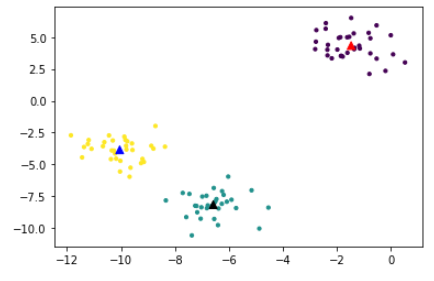
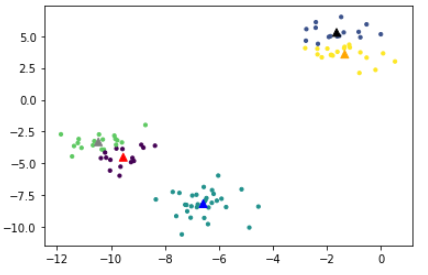
- K 의 값을 변경했을 때 결과는 위의 그래프와 같다. 여기서 적합한 k의 값을 찾기 위해서는 PCA를 사용하여 데이터의 형태가 어떻게 되어 있는지 판단하고 군집화 진행하는 것을 추천
[병합 군집]
- 시작할 때, 각각의 포인트 하나하나가 클러스터로 지정됨
- 종료 조건을 만족할 때까지 가장 비슷한 두 클러스터를 합쳐 나간다.
- 사이킷런의 종료 조건은 클러스터 개수
- linkage옵션에서 가장 비슷한 클러스터를 측정하는 방법 지정
- ward: 기본값인 ward연결은 클로스터의 분산을 가장 작게 증가시키는 두 클러스터를 합침
- average: 클러스터 포인트 사이의 평균 거리가 가장 짧은 두 클러스터 병합
- complete: 클러스터 포인트 사이의 최대 거리가 가장 짧은 두 클러스터 병합
- 계층적 클러스터링 : 군집 하나의 데이터 샘플을 하나의 클러스터로 보고 가장 유사도가 높은 클러스터를 합치면서 클러스터 갯수를 줄여 가는 방법을 말한다.
1. Agglomerative Clustering : scikit-learn 패키지
from sklearn.cluster import AgglomerativeClustering
from sklearn import datasets
import matplotlib.pyplot as plt


X, y = datasets.make_blobs(random_state = 1)
agg = AgglomerativeClustering(n_clusters = 3)
assign = agg.fit_predict(X)
%matplotlib inline
fig, ax = plt.subplots()
scatter = ax.scatter(X[:,0], X[:,1],
                    c = assign, marker="o", s=10)
ax.legend(*scatter.legend_elements(),
         loc = 'lower right', title = 'classes')
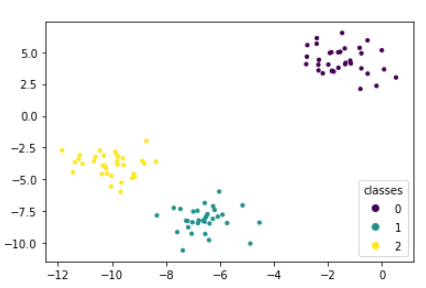
2. 덴드로그램(dendrogram) 사용 : SciPy 패키지 -> 결과를 시각화 해줌
from scipy.cluster.hierarchy import dendrogram, ward
import seaborn as sns

X,y = datasets.make_blobs(random_state=0, n_samples=12)

linkage_array = ward(X) # 분산을 최소화하는 방향으로 클러스터 함
dendrogram(linkage_array) # 위계를 가지는 형태로 만들어줌

ax = plt.gca()
bounds = ax.get_xbound()
ax.plot(bounds, [7.25, 7.25], '--', c='k')
ax.plot(bounds, [4, 4], '--', c='k')

ax.text(bounds[1], 7.25, 'two clusters', va='center', fontdict={'size':15})
ax.text(bounds[1], 4, 'three clusters', va='center', fontdict={'size':15})
plt.xlabel('sample No.')
plt.ylabel('cluster distance')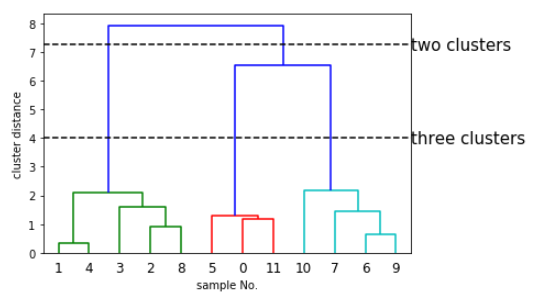
[DBSCAN]
- density-based spatial clustering of applications with nois
- 클러스터의 개수를 미리 정할 필요가 없음
- 복잡한 형상도 찾을 수 있으며, 어떤 클래스에도 속하지 않는 포인트를 비교적 잘 구분해낸다
- 병합군집, k-mean 보다는 느림
<방법>
- 특성 공간에서 가까이 있는 데이터가 많은, 밀도가 높은 지역의 포인트를 찾음
- 데이터 밀집 지역이 한 클러스터를 구성하며, 비교적 비어 있는 지역을 경계로 다른 클러스터와 구분된다는 아이디어
- min_sample, eps 2개의 매개변수
- 한 데이터 포인트에서 eps 거리 안에 데이터가 min_samples 만큼 있으면, 이 데이터 포인트를 핵심 샘플로 분류
- eps 거리 안에 min_samples보다 데이터가 적으면 잡음으로 분류
- 시작할 때는 모자이크 포인트 선택
from sklearn.cluster import DBSCAN
from sklearn import datasets
import matplotlib.pyplot as plt

X,y = datasets.make_blobs(random_state=0, n_samples=12)

dbscan = DBSCAN()
clusters = dbscan.fit_predict(X)
print("cluster label:{}".format(clusters))
# output : cluster label:[-1 -1 -1 -1 -1 -1 -1 -1 -1 -1 -1 -1]
# 해석 :  전부다 잡음이다 클러스터로 분류되지 않았다. 군집으로 분류되지 않았다.

# 그래프 확인(defualt)
%matplotlib inline
plt.scatter(X[:,0],X[:,1],c=clusters, marker = 'o',s=10)


dbscan1 = DBSCAN(min_samples=2, eps=2)
clusters1 = dbscan1.fit_predict(X)
print("cluster label:{}".format(clusters1))
# output : cluster label:[0 1 1 1 1 0 0 0 1 0 0 0]
# 해석 : 0으로 바뀐 두개가 군집화가 된 것을 확인 할 수 있음


# 그래프 확인(min_samples=2, eps=2)
%matplotlib inline
plt.scatter(X[:,0],X[:,1],c=clusters2, marker = 'o',s=10)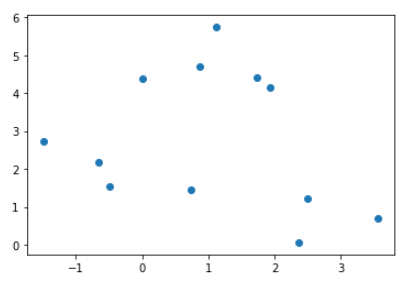
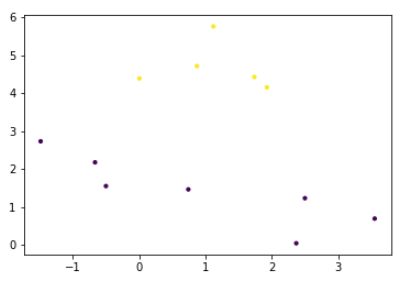
- 위 두개의 그래프를 확인해보면 default 그래프보다 매개변수를 조절한 그래프에서 군집화가 발생했다.
- min_sample의 수를 줄이, eps(거리)를 늘린 결과라고 생각하면 된다.
지금까지 본 군집방식에 있어 눈으로 확인하기 위해 다음을 시도해보았다.
from sklearn.metrics.cluster import adjusted_rand_score
from sklearn.preprocessing import StandardScaler
import numpy as np

X, y = datasets.make_moons(n_samples=200, noise = 0.05, random_state=0)  # 초승달 데이터 -> 그래프가 초승달로 나옴

# 평균이 0, 분산이 1이 되도록 표준화
scaler = StandardScaler()
scaler.fit(X)
X_scaled = scaler.transform(X)

fig, axes = plt.subplots(1,4,figsize=(15,3),
                        subplot_kw={'xticks':(), 'yticks':()})

# 사용할 알고리즘 모델의 리스트 작성
algorithms = [KMeans(n_clusters=2), AgglomerativeClustering(n_clusters=2),
             DBSCAN()]

# randomly assign에서 ARI=0인 그래프 작성 위해 무작위 클러스터 생성
random_state = np.random.RandomState(seed=0) # 랜덤넘버 생성기인 랜덤함수들을 포함하는 클래스
random_clusters = random_state.randint(low=0,high=2,size=len(X)) # 0 부터 2사이의 무작이 난수 생성

# 위에서 생성한 무작위 클러스터 plotting
axes[0].scatter(X_scaled[:,0],X_scaled[:,1], c=random_clusters, s=60, edgecolors = 'b')
axes[0].set_title("randomly assign - ARI: {:.2f}".format(adjusted_rand_score(y, random_clusters)))

# 3가지 군집 알고리즘 적용한 결과 plotting
for ax, algorithm in zip(axes[1:], algorithms):
    clusters = algorithm.fit_predict(X_scaled)
    ax.scatter(X_scaled[:,0], X_scaled[:,1], c=clusters,
              s=60, edgecolors = 'b')
    ax.set_title("{} - ARI: {:.2f}".format(algorithm.__class__.__name__,
                                          adjusted_rand_score(y,clusters)))
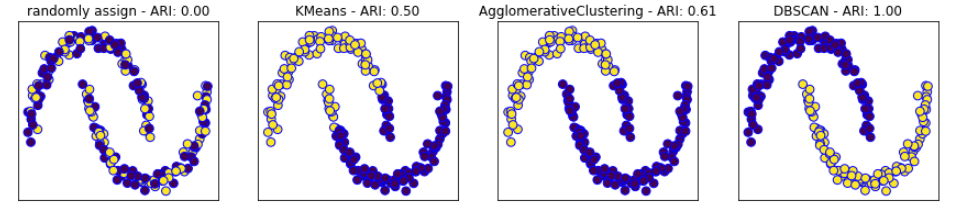
- 그래프를 확인하면 DBSCAN 이 가장 잘 군집화 한 것이라고 생각할 수 있다. 하지만 더 확실하게 하기 위해서는 평가지표를 통한 확인이 필요하다. 이것은 다음 장에서 설명하겠습니다.
'Code > 머신러닝 in Python' 카테고리의 다른 글
| [Python] openCV 이용한 얼굴인식 (0) | 2019.09.03 |
|---|---|
| [Python] PCA(주성분 분석) (0) | 2019.09.03 |
| [Python] Cross-validation + Grid Search (1) | 2019.08.30 |
| [Python] Grid Search (0) | 2019.08.30 |
| [Python] Cross-validation(교차검증) (1) | 2019.08.30 |
[Python] openCV 이용한 얼굴인식
OpenCV(Open Source Computer Vision)
- 인텔에서 만든 강력한 영상처리 라이브러리
- 실시간 이미지 프로세싱에 중점을 둔 라이브러리
- OpenCV-python : OpenCV의 파이썬 API를 모아둔 것
- 아나콘다를 사용하시는 분들은 프롬프트를 열어서 다음 명령어로 설치하시길 바랍니다.
pip install tensorflow
conda update wrapt

pip install keras

pip install opencv-python
- OpenCV를 이용한 간단한 얼굴 인식
import cv2
import sys
# 불러올 경로 결정
image_file = "./image/red.jpg"
cascade_file = "C:/Anaconda3/Lib/site-packages/cv2/data/haarcascade_frontalface_default.xml" # 정면 얼굴인식
cascade_file2 = "C:/Anaconda3/Lib/site-packages/cv2/data/haarcascade_lefteye_2splits.xml"


image = cv2.imread(image_file)
image_gs = cv2.cvtColor(image, cv2.COLOR_BGR2GRAY)
cascade = cv2.CascadeClassifier(cascade_file)
face_list = cascade.detectMultiScale(image_gs,scaleFactor = 1.1,minNeighbors=3, minSize=(70,70))

cascade2 = cv2.CascadeClassifier(cascade_file2)
eye_list = cascade2.detectMultiScale(image_gs,scaleFactor = 1.1, minNeighbors=1,minSize=(10,10))

if len(face_list) > 0:
    print(face_list)
    color = [(0,0,255),(0,255,0)]
    for face in face_list:
        x,y,w,h = face
        cv2.rectangle(image, (x,y), (x+w, y+h), color[0], thickness=8)
        # 이미지, 가로,세로 시작 위치, 끝나는 위치, 컬러, 선의 굵기
    if len(eye_list) > 0:
        print(eye_list)
        for eye in eye_list:
            x,y,w,h = eye
            cv2.rectangle(image, (x,y), (x+w, y+h), color[1], thickness=8)
    cv2.imwrite("facedetect-output.PNG", image)

else:
    print("no face")
- 아나콘다에서 openCV가 정상적으로 설치되었을 경우 위와 같은 파일경로에 파일이 있는 것을 확인할 수 있습니다.
- 이미지를 사용자에 따라 저장한 위치에서 불러오고 cascade를 통해 어떤 것을 분류할 것인지 결정합니다.
- minNeighbors : 각 후보 사각형을 유지해야하는 이웃 수를 지정
- minsize : 가능한 최소 객체 크기
- facedetect-output.PNG
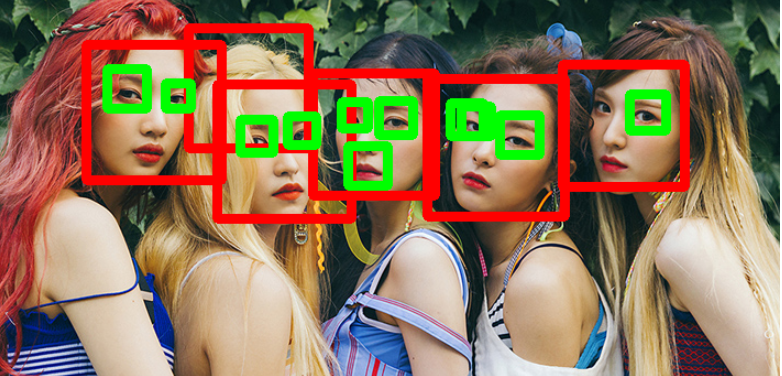
- 저는 레드벨벳 얼굴로 테스트를 해보았고 완전히 찾아내지는 못했지만 어느정도 인식하는 것으로 확인 할 수 있었습니다.
# 각각 xml 설명
[정면 얼굴 검출]
arcascade_frontalface_default.xml
haarcascade_frontalface_alt.xml
haarcascade_frontalface_alt2.xml
haarcascade_frontalface_alt_tree.xml


[측면 얼굴 검출]
haarcascade_profileface.xml


[웃음 검출]
haarcascade_smile.xml


[눈 검출]
haarcascade_eye.xml
haarcascade_eye_tree_eyeglasses.xml
haarcascade_lefteye_2splits.xml
haarcascade_righteye_2splits.xml


[고양이 얼굴 검출]
haarcascade_frontalcatface.xml
haarcascade_frontalcatface_extended.xml


[사람의 전신 검출]
haarcascade_fullbody.xml


[사람의 상반신 검출]
haarcascade_upperbody.xml


[사람의 하반신 검출]
haarcascade_lowerbody.xml


[러시아 자동차 번호판 검출]
haarcascade_russian_plate_number.xml
haarcascade_licence_plate_rus_16stages.xml
'Code > 머신러닝 in Python' 카테고리의 다른 글
| [Python] 비지도 학습 - 군집분석 (0) | 2019.09.04 |
|---|---|
| [Python] PCA(주성분 분석) (0) | 2019.09.03 |
| [Python] Cross-validation + Grid Search (1) | 2019.08.30 |
| [Python] Grid Search (0) | 2019.08.30 |
| [Python] Cross-validation(교차검증) (1) | 2019.08.30 |
[Python] PCA(주성분 분석)
Principal Component Analysis(PCA, 주성분 분석)
-
주성분 분석은 차원축소를 위해 사용됨 -> 고차원의 데이터를 저차원의 데이터로 변환
- 목적
- 차원(dimension)을 감소시켜 해석을 용이하게 하고, 시각화에 도움
- 기대효과
- 통계 : 적은 수의 특성으로 특정 현상을 설명
- 머신러닝 : 모델 성능 강화
- 목적
-
개념
- 여러개의 양적 변수들 사이의 분선-공분산 관계를 이용하여, 변수들의 선형결합으로 표시되는 주성분을 찾음(축의 개념)
- 2-3개의 주성분으로 전체 분산(variance)의 대부분을 설명하고자 하는 다변량 분석법
- 원 데이터의 손실을 최소화하면서 데이터를 잘 설명할 수 있는 변수들의 선형 조합을 찾는 것이 목표
- 라면 데이터를 이용한 PCA()
import pandas as pd
import numpy as np
from sklearn import datasets
import matplotlib.pyplot as plt
from sklearn.preprocessing import StandardScaler


lamen = dict({'name':['쇠고기라면','해물라면','얼큰라면','떡라면','짬뽕라면','만두라면','치즈라면','된장라면','볶음라면','김치라면'],
             'noodle':[2,1,5,2,3,4,4,1,3,5],
             'bowl':[4,5,3,2,5,3,4,2,3,5],
             'soup':[5,1,4,3,5,2,3,1,2,3]})
lamen

lamen1 = pd.DataFrame(lamen)
lamen1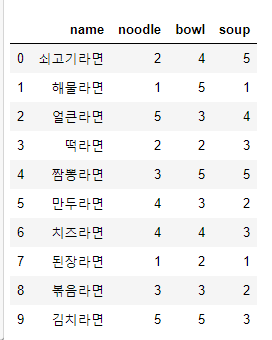
- 데이터 프레임으로 변경하면 위와 같은 표가 나오게 된다. (면, 그릇, 국물에 대한 수치)
# 1. 데이터 분리
lamenEval = lamen1[['noodle','bowl','soup']]
lamenName = lamen1['name']

# 2. 스케일러로 값 변환
# scaling using StandardScaler

scaler = StandardScaler()
scaler.fit(lamenEval.values)
lamen_scaled = scaler.transform(lamenEval.values)

lamen_scaled.shape
# (10,3)


# 3. PCA 모델링
# - PCA.fit() : 주성분 찾음
# - PCA.transform() : 새로운 주성분으로 데이터 변환

# PCA modelling
from sklearn.decomposition import PCA

pca_lamen = PCA()
pca_lamen.fit(lamen_scaled)

# data transform
X_pca_lamen = pca_lamen.transform(lamen_scaled)

# look into data shape
print("original data : {}".format(str(lamen_scaled.shape)))
print("transform data : {}".format(str(X_pca_lamen.shape)))

# original data : (10, 3)  transform data : (10, 3)
- 사이킷런에서 제공하는 PCA를 호출하여 적용을 시켰을 때 결과르 확인하면 전과 후의 데이터 형태가 같은 것을 확인할 수있다.
pca_lamen.components_

# output
array([[-0.571511  , -0.52211611, -0.63306393],
       [-0.60447096,  0.78960694, -0.105526  ],
       [-0.5549685 , -0.32235949,  0.76687308]])
- PCA 모델에 의해 산출된 값을 보면 --> pca_lamen.components_
- 첫 행부터 각 pc1, pc2, pc3 을 의미하며, 열은 각각 noodle, bowl, soup를 의미함
- 산출한 특성별 주성분 요소 값과 특성들의 평가 스코어를 이용하여, 역산을 해보고 PCA 모델링을 통해 변환된 최종 데이터와 일치하는지 확인해보세요
# PCA 1,2,3 에 대한 변환 스코어
pc1=0
pc2=0
pc3=0

for j in range(len(pca_lamen.components_)):
    pc1 += pca_lamen.components_[0][j] * lamen_scaled[:,j] # 계수 3개에 있어서 스케일된 모든 열을 다 곱하고 더한 것 = pc1
    pc2 += pca_lamen.components_[1][j] * lamen_scaled[:,j]
    pc3 += pca_lamen.components_[2][j] * lamen_scaled[:,j]

pc1 = pc1.reshape(10,1)
pc2 = pc2.reshape(10,1)
pc3 = pc3.reshape(10,1)

np.round(np.hstack((pc1,pc2,pc3)),3) == np.round(X_pca_lamen,3)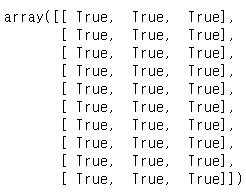
- 결과가 모두 True로 pca_lamen.components_의 값들과 스케일링 된 lamen_scaled 데이터와 곱하고 더하면 PCA의 결과인 X_pca_lamen 과 데이터가 같은 것을 확인할 수 있다.
- 시각적으로 확인하고 싶을 때
def biplot2(score, coeff, label, pcax, pcay, labels = None):
    pca1=pcax-1
    pca2=pcay-1
   ㅇ xs = score[:,pca1]
    ys = score[:,pca2]
    n=score.shape[1]
    scalex = 1.0/(xs.max() - xs.min())
    scaley = 1.0/(ys.max() - ys.min())

    for i in range(len(xs)):
        plt.scatter(xs[i]*scalex, ys[i]*scaley)
        plt.annotate(label.iloc[i], xy=(xs[i]*scalex, ys[i]*scaley), ha='right')

    for i in range(n):
        plt.arrow(0, 0, coeff[i,pca1], coeff[i,pca2], color='r', alpha=1)
        if labels is None:
            plt.text(coeff[i,pca1]*1.15, coeff[i,pca2]*1.15, "Var"+str(i+1), color='g', ha = 'center', va='center')
        else:
            plt.text(coeff[i,pca1]*1.15, coeff[i,pca2]*1.15, labels[i], color='g', ha='center', va='center', size=15)
    plt.xlim(-0.8, 0.75)
    plt.ylim(-1,1)
    plt.xlabel("PC{}".format(pcax))
    plt.ylabel("PC{}".format(pcay))
    plt.grid()


 ##한글 폰트 설정
import matplotlib.pyplot as plt
import matplotlib.font_manager as fm

font_path="C:\\Windows\\Fonts\\malgun.ttf"
font_name=fm.FontProperties(fname=font_path).get_name()
plt.rcParams['font.family']=font_name

%matplotlib inline
biplot2(X_pca_lamen, pca_lamen.components_, lamenName, 1,2,labels=lamenEval.columns)
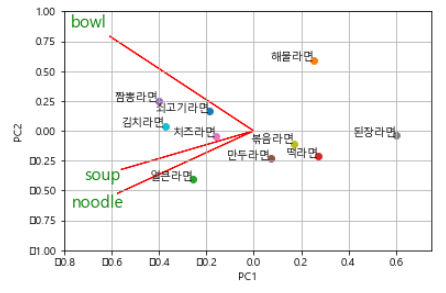
- 그래프 해석
-
면과 국물의 축이 가까우므로, 둘 사이에 비교적 강한 양의 상관관계가 있다
-
그릇은 나머지 변수와 비교적 상관관계가 적다(같은 방향 : 약한 양의 상관관계)
-
얼큰라면은 나머지 변수에 비해 면에서 높은 점수를 받았다
-
짬뽕라면과 김치라면은 전체적으로 점수가 높을 것이며, 짬뽕라면은 그릇의 점수도 높을 것이다
-
해물라면은 면, 국물과 반대방향이므로 음의 상관관계가 있다. 반면, 그릇의 점수는 상당히 높을 것
-
된장라면은 그릇의 점수가 낮을 것이며, 면과 국물의 점수 역시 낮을 것이다.
-
볶음, 만두, 떡은 전체적으로 점수가 고르며, 큰 특성을 보이지 않을 것
'Code > 머신러닝 in Python' 카테고리의 다른 글
| [Python] 비지도 학습 - 군집분석 (0) | 2019.09.04 |
|---|---|
| [Python] openCV 이용한 얼굴인식 (0) | 2019.09.03 |
| [Python] Cross-validation + Grid Search (1) | 2019.08.30 |
| [Python] Grid Search (0) | 2019.08.30 |
| [Python] Cross-validation(교차검증) (1) | 2019.08.30 |
[Python] Cross-validation + Grid Search
Cross-validation + Grid Search
- 데이터를 train, validation, test set으로 나누는 방법은 성능이 좋고 널리 사용되지만, 전 게시글과 같이 데이터를 나누는 방법에 매우 민감
- 일반화 성능을 더 잘 평가하기 위해서는 훈련세트와 검증세트를 한번만 나누지 않고, 교차 검증을 사용해서 각 매개 변수의 조합의 성능을 평가 할 수 있음
# 1. 데이터 분할

iris = datasets.load_iris()

X = iris.data
y = iris.target

X_trainval, X_test, y_trainval, y_test = train_test_split(X,y,test_size=0.25, random_state=0)


# 2. Cross-validation + Grid Search
best_score = 0

for gamma in [0.001,0.01,0.1,1,10,100]:
    for C in [0.001,0.01,0.1,1,10,100]:
        # train SVC using combination of gamma and C
        svm = SVC(gamma = gamma, C = C)

        # evaluate model
        scores = cross_val_score(svm, X_trainval, y_trainval, cv=5)  # svm 모델 사용, 검증 나누지 않고 train데이터 사용

        # mean of cross-validation
        score = np.mean(scores)

        # restore the highest score with its parameter
        if score > best_score:
            best_score = score
            best_parameter = {'gamma':gamma, 'C':C}

svm = SVC(**best_parameter)
svm.fit(X_trainval,y_trainval)  # train + validation 모두 합한 데이터 가지고 평가
train_score = svm.score(X_trainval, y_trainval)  # 테스트에 대한 점수
test_score = svm.score(X_test, y_test)

train_score,test_score
# output : (0.9821428571428571, 0.9736842105263158)
< GridSearchCV >
- 교차 검증을 사용한 그리드 서치를 매개변수 조정 방법으로 널리 사용하므로, scikit-learn은 GridSearchCV를 제공하고 있음
- 검색 대상이 되는 매개변수를 딕셔너리 자료형으로 구성해야 함
from sklearn.model_selection import GridSearchCV

# 1. parameter grid 생성
param_grid = {'C':[0.001,0.01,0.1,1,10,100],'gamma':[0.001,0.01,0.1,1,10,100] }


# 2. GridSearchCV 이용하여 객체 생성
grid_search = GridSearchCV(SVC(), param_grid, cv =5, return_train_score=True)


# 3. 데이터 분할
## 데이터가 과대적합 되는 것을 방지하기 위해, 또한 최종 모델의 객관적인 정확도 평가를 위해 test data를 분리하고
## gridsearch 및 cross-validation에 사용되지 않도록 한다

X_train, X_test, y_train, y_test = train_test_split(iris.data, iris.target, random_state=0 ,test_size=0.2)


# 4. gridsearch model
grid_search.fit(X_train, y_train)


# 5. model evaluation
print("test set score : {}".format(grid_search.score(X_test, y_test)))
# output : test set score : 1.0

# 6. best parameter and best score
print("best parameters : {}".format(grid_search.best_params_))
print("best score : {}".format(grid_search.best_score_))
# output : best parameters : {'C': 1, 'gamma': 0.1}
#          best score : 0.9583333333333334
- 여기서 5. 과 6. 의 결과를 구분하는 것이 필요
- 5. : 교차 검증과 그리드 서치의 결과로 산정한 최적 매개변수를 적용하여 전체 훈련 데이터 셋에 대해 훈련한 최종 모델에 테스트 데이터로 적용했을 때의 결과
- 6. : best_score_ 속성은 훈련 세트에서 수행한 교차검증의 평균 정확도가 저장된 결과
* GridSearchCV.fit 메서드는 최적의 매개변수를 찾는 일뿐만 아니라, 교차 검증 성능이 가장 좋은 매개변수로 전체 훈련 데이터 세트에 대해 새로운 모델을 자동으로 만든다.
[교차 검증 결과 분석]
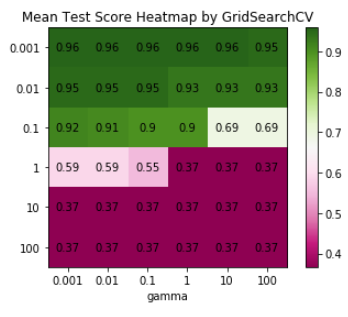
- 결과를 시각화하면 검색 대상 매개변수가 모델의 일반화에 영향을 주는 정도를 이해하는데 도움을 준다
- grid search는 연산 비용이 높으므로, 비교적 간격을 넓게 하여 적은 수의 그리드로 시작하는 것이 좋다.
- 이후 결과를 분석하여 검색을 확장해 나갈 수 있다
- 그리드 서치의 결과는 cv_results_ 속성에 있다
import pandas as pd
import numpy as np
import matplotlib.pyplot as plt

# 1. cv_results_ dictionary -> dataFrame
results = pd.DataFrame(grid_search.cv_results_)


# 2. first 5 rows
results.head(5)
# 여기서 grid_search.cv_results_ 의 값들을 확인 할 수 있다.


# 3. heatmap
scores = np.array(results.mean_test_score.sort_values(ascending=False)).reshape(6,6)
fig, ax = plt.subplots()
im = ax.imshow(scores, cmap='PiYG')
cbar = ax.figure.colorbar(im, ax=ax)
cbar.ax.set_ylabel(ylabel="parameter C ", rotation=-90, va = "bottom")
ax.set_xticks(np.arange(len(set(results.param_gamma))))
ax.set_yticks(np.arange(len(set(results.param_C))))

ax.set_xticklabels(param_grid['gamma'])
ax.set_yticklabels(param_grid['C'])

for i in range(len(param_grid['C'])):
    for j in range(len(param_grid['gamma'])):
        text = ax.text(j,i,np.round(scores[i,j],2),ha='center', va='center',color='k')

ax.set_title("Mean Test Score Heatmap by GridSearchCV")
ax.set_xlabel("gamma")
'Code > 머신러닝 in Python' 카테고리의 다른 글
| [Python] openCV 이용한 얼굴인식 (0) | 2019.09.03 |
|---|---|
| [Python] PCA(주성분 분석) (0) | 2019.09.03 |
| [Python] Grid Search (0) | 2019.08.30 |
| [Python] Cross-validation(교차검증) (1) | 2019.08.30 |
| [Python] 분류분석 - SVM(Support Vector Machine) (1) | 2019.08.29 |
[Python] Grid Search
Grid Search
- 매개 변수를 튜닝하여 일반화 성능을 개선하고자 함
- 관심 있는 매개변수들을 대상으로 가능한 조합을 시도하여 최적의 값을 찾음
- SVM에 적용하여 gamma, C의 조합을 찾아보자
커널 기법
- 비선형 특성을 추가하여 선형 모델을 사용할 경우, 특성이 많을 때 연산비용이 증가할 뿐 아니라 데이터가 부정확해질 위험이 있다.
- 수학적 기법을 이용하여 새로운 특성을 임의로 만들지 않고 고차원에서 학습할 수 있다 --> 커널 기법
from sklearn.svm import SVC
from sklearn import datasets
from sklearn.model_selection import train_test_split

# 1. load data and split
iris = datasets.load_iris()

X = iris.data
y = iris.target
X_train, X_test, y_train, y_test = train_test_split(X,y,test_size=0.3, random_state=0)


# 2. Grid Search

best_score = 0

# 임의의 gamma와 C를 지정해 반복문으로 돌려봄
for gamma in [0.001,0.01,0.1,1,10,100]:
    for C in [0.001,0.01,0.1,1,10,100]:
        # train SVC using combination of gamma and C
        svm = SVC(gamma = gamma, C = C)
        svm.fit(X_train, y_train)

        # evaluate model
        test_score = svm.score(X_test, y_test)

        # restore the highest score with its parameter
        if test_score > best_score:
            best_score = test_score
            best_parameter = {'gamma':gamma, 'C':C}
            train_score = svm.score(X_train, y_train)

print("Best score : {}".format(np.round(best_score,3)))
print("Train score : {}".format(train_score))
print("parameters :{}".format(best_parameter))

- gamma와 C를 임의로 주어 반복문 돌린 결과로 모델의 정확도가 97% 라고 결론 짓는 것은 위험
- 매개변수를 조정하기 위해 테스트 세트를 이미 사용했기 때문에 최종 모델의 정확성은 새로운 데이터가 생성될 때까지 알 수 없다
- 즉, 최종 평가를 위해서는 모델을 만들고 튜닝할 때 사용하지 않은 독립된 데이터 셋이 필요
- 애당초 데이터셋을 3개(train, validation, test) 로 나누어 이 문제 해결 가능 -> 하지만 데이터의 수가 적을 경우 부정확할 수 있음
- 검증 데이터 분류 후 확인
# 1. 데이터 분할 step1 -> train+validation/test

iris = datasets.load_iris()

X = iris.data
y = iris.target
X_trainval, X_test, y_trainval, y_test = train_test_split(X,y,test_size=0.25, random_state=0)


# 1. 데이터 분할 step2 -> train, validation

X_train, X_valid, y_train, y_valid = train_test_split(X_trainval,y_trainval,test_size=0.25,random_state=1)
print("train set size : {} , validation set size : {} , test set size: {}".format(X_train.shape[0],X_valid.shape[0],X_test.shape[0]))

# output : train set size : 84 , validation set size : 28 , test set size: 38


# 2. Grid Search
best_score = 0

for gamma in [0.001,0.01,0.1,1,10,100]:
    for C in [0.001,0.01,0.1,1,10,100]:
        # train SVC using combination of gamma and C
        svm = SVC(gamma = gamma, C = C)
        svm.fit(X_train, y_train)

        # evaluate model
        test_score = svm.score(X_valid, y_valid)  # train 데이터 학습한 것에서 검증 데이터 가지고 점수

        # restore the highest score with its parameter
        if test_score > best_score:
            best_score = test_score
            best_parameter = {'gamma':gamma, 'C':C}


# train / validation set을 합쳐 최적 모델 적합도
# test set 사용해 평가

svm = SVC(**best_parameter)
svm.fit(X_trainval,y_trainval)  # trainval : train + validation 모두 합한 데이터
test_score = svm.score(X_test, y_test)  # 테스트에 대한 점수

print("Best score : {}".format(np.round(best_score,3)))
print("test score : {}".format(test_score))
print("parameters :{}".format(best_parameter))
- 결과 : Best score : 0.964 test score : 0.9210526315789473 parameters :{'gamma': 0.001, 'C': 10}
'Code > 머신러닝 in Python' 카테고리의 다른 글
| [Python] PCA(주성분 분석) (0) | 2019.09.03 |
|---|---|
| [Python] Cross-validation + Grid Search (1) | 2019.08.30 |
| [Python] Cross-validation(교차검증) (1) | 2019.08.30 |
| [Python] 분류분석 - SVM(Support Vector Machine) (1) | 2019.08.29 |
| [Python] 분류분석 - logistic regression (0) | 2019.08.28 |
[Python] Cross-validation(교차검증)
Cross-validation(교차검증)
-
일반화 성능을 평가하는데에 트레인/테스트 데이터로 한 번 나누는 것보다 더 안정적이고 뛰어난 통계적 평가 방법
-
교차 검증에서는 데이터를 여러번 반복해서 나누고 여러 모델을 학습함
-
대표적으로 k-fold cross-validation(k-겹 교차검증)
1.1 scikit-learn의 교차검증(KFold)
- model_selection 모듈의 cross_val_score 함수로 구현
from sklearn import datasets
from sklearn.model_selection import cross_val_score
from sklearn.linear_model import LogisticRegression


# 1. load iris
iris = datasets.load_iris()


# 2. create model object
logreg = LogisticRegression()


# 3. cross-validation
scores = cross_val_score(logreg, iris.data, iris.target)
print("cross validation scores : {}".format(scores))
# 결과 : cross validation scores : [0.96078431 0.92156863 0.95833333]


# 3.1 cross-validation: k=5
scores_K5 = cross_val_score(logreg, iris.data, iris.target,cv =5)
print("cross validation scores : {}".format(scores_K5))
# 결과 :cross validation scores : [1.   0.96666667 0.93333333 0.9   1.   ]


# 3.1.1 cross-validation: k=5  -> 평균
print("cross validation scores : {:.2f}".format(scores_K5.mean()))
# 결과 : cross validation scores : 0.96
- 3. 과 3.1 은 cv의 값이 다르기 때문에 cv값에 따라 폴드되어 검증하기 때문에 결과가 k=5일 때, scores가 5개가 나오게 된다.
1.2 교차 검증 시 주의 사항
- 단순한 k겹 교차 검증은 데이터가 랜덤하지 않은 경우, 특히 분류 문제에서 클래스 별로 구성된 데이터일 때, 적용에 주의해야 함
-
위와 같은 데이터 형태일 때는 model_selection 모듈 내의 KFold()를 사용하여 기본형 k겹 교차검증을 보완할 수 있다.
* K-Fold : 검증을 하기 위해 데이터를 분리하는데 train, test로 분류하지 않고 train -> train + validation(검증) 으로 나누어서 검증을 할 수 있다. 그렇지만 데이터의 수가 작은 경우에 제대로 할 수 없기 때문에 사용하게 된다.
예를 들어 k=5를 선택한다면,
1) 데이터를 비슷한 크기의 부분집합 5개로 나눔
2) 첫번째 모델은 train : [ 1 2 3 4 ] test : [ 5 ], 두번째 모델은 train : [ 1 2 3 5 ] test : [ 4 ] ....
3) 이와 같이 5개의 정확도 값을 얻게됨
from sklearn.model_selection import KFold

# 1.1 KFold default parameter
kfold = KFold(n_splits=3)

# 1.1.1 socore
print("cross validation score : {}".format(cross_val_score(logreg, iris.data, iris.target, cv = kfold)))
# 결과: cross validation score : [0. 0. 0.]


# 1.2 KFold shuffle
kfold1 = KFold(n_splits=3, shuffle=True, random_state=0)

# 1.2.1 score
print("cross validation score : {}".format(cross_val_score(logreg, iris.data, iris.target, cv = kfold1)))
# 결과 : cross validation score : [0.9  0.96 0.96]
- 1.1 에서 iris 데이터는 품종별로 데이터가 정리되어 있다. 원하는 것이 품종(class) 인데 이것을 n_splits = 3이 되면 클래스가 분리되어 사라지게 되므로 1.1.1의 결과가 0 이 나온다
- 이런 점을 방지하기 위해 shuffle을 해준다.
1.3 임의분할 계층별 교차검증
- 매우 유연한 교차 검증 전략
- train_size / test_size로 데이터 임의 분할(중복 없음)
- 이 분할은 n_split 횟수만큼 반복됨
- 예를 들어, 샘플이 10개인 데이터에서 train_size=6, test_size=2로 설정하면, 2개의 샘플은 사용되지 않음
- 계층별 즉, 클래스의 존재 비율에 따라 추출하여 검증
from sklearn.model_selection import StratifiedShuffleSplit
import numpy as np
import pandas as pd
import matplotlib.pyplot as plt


# 1. StratifiedShuffleSplit 이용 (계층 이용)
stratified_shuffle_split = StratifiedShuffleSplit(train_size=0.7, test_size=0.3, n_splits=10, random_state=0)


# 2. 교차검증 점수
# 로지스틱 모델 사용하며, cv : 폴드 수( n_splits = 10 이여서 10이 들어가게 됨)
score = cross_val_score(logreg, iris.data, iris.target, cv=stratified_shuffle_split)


# 3. 점수 확인
print("score : {}".format(score))
# n_splits = 10개여서 10번의 횟수만큼 반복됨
# output : score : [0.97777778 0.91111111 0.95555556 0.91111111 0.95555556 0.93333333 0.97777778 0.95555556 0.97777778 1.        ]


# 4. 데이터 확인 방법
X = iris.data
y = iris.target

for train_index, test_index in stratified_shuffle_split.split(X,y):
    print("train:",train_index,"\n","test:",test_index)
    X_train,X_test = X[train_index],X[test_index]
    y_train,y_test = y[train_index],y[test_index]
# 결과는 train과 test가 10개씩 각각 안엔 위에서 정한 train 70%, test 30% 씩 무작위로 섞여있다.


# 5. 교차검증 확인
sss = cross_val_score(logreg, iris.data, iris.target, cv = stratified_shuffle_split)
sss.mean()  # 0.9555555555555555


# y_train 데이터 확인
np.bincount(y_train) # 총 카운트 array([35, 35, 35], dtype=int64)
plt.hist(y_train) # 그래프 확인
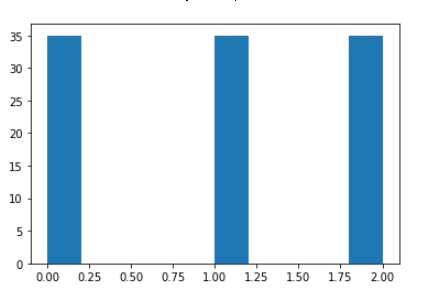
- 그래프의 결과를 보면 35개씩 세개의 클래스가 동일한 값을 가진 것을 확인할 수 있다. 임의 계층으로 분류할 때 클래스의 비율로 하기 때문에 (iris의 품종 클래스 비율 1 : 1 : 1) 동일한 값이 나오게 된 것이다.
'Code > 머신러닝 in Python' 카테고리의 다른 글
| [Python] Cross-validation + Grid Search (1) | 2019.08.30 |
|---|---|
| [Python] Grid Search (0) | 2019.08.30 |
| [Python] 분류분석 - SVM(Support Vector Machine) (1) | 2019.08.29 |
| [Python] 분류분석 - logistic regression (0) | 2019.08.28 |
| [Python] LinearRegression(수치예측) - Lasso (0) | 2019.08.28 |
[Python] 분류분석 - SVM(Support Vector Machine)
Support Vector Machine
- 기계 학습의 분야 중 하나로 패턴 인식, 자료 분석을 위한 지도 학습 모델
- 주로 분류와 회귀분석을 위해 사용
- 선형 분류와 비선형 분류에서도 사용
1. 선형 SVM
- parameter C를 조정해 과대적합 혹은 과소적합 문제를 해결
- C(cost function) 값이 크면(높은 코스트) -> 훈련을 더 복잡하게-> 약한 규제
- C 값이 작으면(낮은 코스트) -> 훈련을 덜 복잡하게 -> 강한 규제
from sklearn.svm import LinearSVC
from sklearn import datasets
from mlxtend.plotting import category_scatter
import pandas as pd
import numpy as np


# 1. toy dataset 생성
X, y = datasets.make_blobs(random_state=42)


# 2. 데이터 프레임으로 만들기
df = pd.DataFrame(X, columns=['feature0', 'feature1'])
df['class'] = y
df


# 3. 그래프 확인
category_scatter(x='feature0', y='feature1', label_col='class',data=df,legend_loc='lower right')
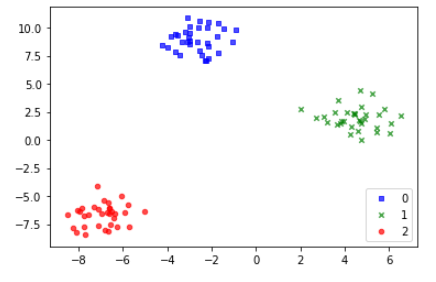
- 그래프를 확인하면 y가 3가지의 값을 가지는 것을 보고 클래스가 3개임을 알 수 있다.
- 클래스별 데이터들의 분포를 확인하는 그래프이다.
# 4. 모델링
linear_svm=LinearSVC().fit(X,y) # C=1.0


# 5.1 클래스별 계수 확인
linear_svm.coef_


# 5.2 클래스별 절편
linear_svm.intercept_

# 그래프

import matplotlib.pyplot as plt

line = np.linspace(-15, 15) # 지정된 간격 동안 균일 한 간격의 숫자를 반환합니다.

fig, ax = plt.subplots()
scatter = ax.scatter(X[:,0], X[:,1],c = y, s = 50)

for coef, intercept, color in zip(linear_svm.coef_,
                                 linear_svm.intercept_,
                                 ["black","blue","red"]):
    ax.plot(line, -(line*coef[0]+intercept)/coef[1], c = color)
ax.set_ylim(-10, 15)
ax.set_xlim(-10, 8)
ax.legend(*scatter.legend_elements(), loc = "best", title = "class")
- coef_ : 클래스별 계수 즉, ax+b 에서 a를 의미하며, (3,2)의 형태로 출력되게 된다.
- intercept_ : 클래스별 절편으로 즉, ax+b에서 b를 의미하며, (3,) 형태로 출력되게 된다.
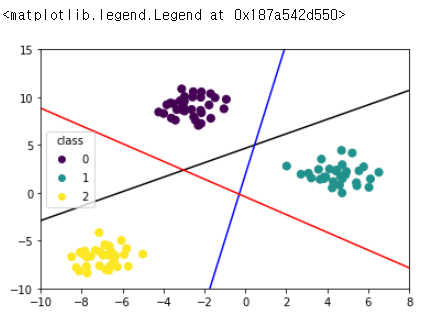
- 그래프에서 보이는 선은 선형 결정 경계로 소프트 벡터 머신에서 중요하게 생각하는 것이다.
- 넓은 마진(두 데이터 포인터와 경계가 떨어진 정도)을 가지는 것이 안정적이며, 모든 클래스를 구분할 수 있어야 한다.
from mlxtend.plotting import plot_decision_regions

# 최종 그래프 확인
plot_decision_regions(X=X, y=y, clf=linear_svm, legend=4)
plt.title('SVC Decision Region Boundary', size=15)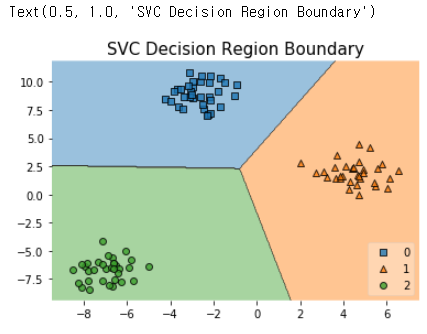
- 최종 그래프를 면으로 확인해보면 위와 같은 그래프 형태를 나타나게 된다.
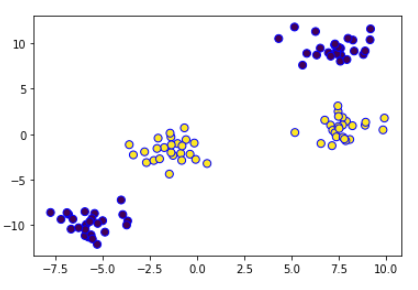
2. SVM
# 1. toy 데이터
X, y = datasets.make_blobs(centers=4, random_state=8)
y = y%2

# 그래프 확인
plt.scatter(X[:,0],X[:,1],c=y,s=50,edgecolors="b")
from mpl_toolkits.mplot3d import Axes3D
from matplotlib import cm

# 2. 2번째 특성 제곱하여 추가
X_new = np.hstack([X,X[:,1:]**2]) # 제곱을 새로운 열로 만들어 줌
X_new

# 그래프 확인
figure = plt.figure()
ax = Axes3D(figure, elev=-162, azim=-26) # 각도 틀어주는 파라미터
mask = y==0
ax.scatter(X_new[mask,0], X_new[mask,1], X_new[mask,2], c='b', s=60, edgecolor='k')
ax.scatter(X_new[~mask,0], X_new[~mask,1], X_new[~mask,2], c='r', marker = '^', s=60, edgecolor='k')
ax.set_xlabel('feature0')
ax.set_ylabel('feature1')
ax.set_zlabel('feature0 ** 2')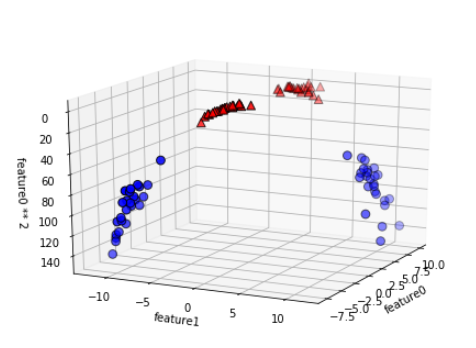
- 1번째 열의 값을 제곱하여 2번째 열로 붙이는 작업 수행
- 3D 그래프를 위해 Axes3D를 이용함
- y 는 0과 1인 2개의 클래스 -> mask를 통하여 y가 0인지 1인지를 구분하여 0인 행은 파란색, 1인 행은 빨간색으로 표시
linear_svm_3d = LinearSVC(max_iter=10000).fit(X_new,y)
coef, intercept = linear_svm_3d.coef_.ravel(), linear_svm_3d.intercept_
# 선형 결정 경계 그려주기

figure = plt.figure()
ax = Axes3D(figure, elev=-140, azim=-26)

xx = np.linspace(X_new[:,0].min() - 2, X_new[:,0].max()+2,50)
yy = np.linspace(X_new[:,1].min() - 2, X_new[:,1].max()+2,50)
# 평면 그려주기 위해 조금 범위 넓게 (+2) 만큼 해줌

XX,YY = np.meshgrid(xx,yy)
ZZ = (coef[0]*XX+coef[1]*YY+intercept)/(-coef[2])

ax.plot_surface(XX,YY,ZZ,rstride=8,cstride=8,alpha=0.3,cmap=cm.Accent)

ax.scatter(X_new[mask,0], X_new[mask,1], X_new[mask,2], c='b', s=60, edgecolor='k')
ax.scatter(X_new[~mask,0], X_new[~mask,1], X_new[~mask,2], c='r', marker = '^', s=60, edgecolor='k')
ax.set_xlabel('feature0')
ax.set_ylabel('feature1')
ax.set_zlabel('feature0 ** 2')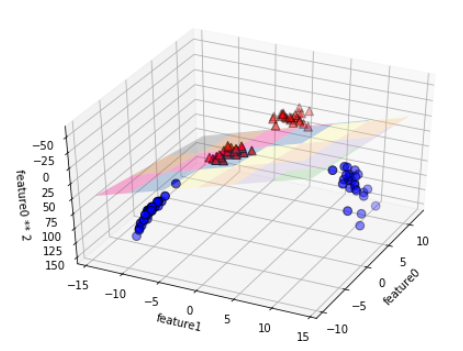
**주요 parameter
-
gamma :가우시안 커널의 반경을 결정.
감마 값이 크면 커널의 반경 좁아짐 -> 훈련에 각각의 데이터 포인트를 더욱 반영 -> 복잡한 증가
감마 값이 작으면 커널의 반경 넓어짐 -> 훈련에 더 넓은 면적에 걸친 데이터 포인트를 반영 -> 복잡도 감소
- C: cost function 과 동일
즉, C는 데이터 샘플들이 다른 클래스에 놓이는 것을 허용하는 정도를 결정, gamma는 결정 경계의 곡률을 결정
* 정규화 :
# 모든 특성 정규화

# 1) 트레인 데이터 특성별 최소값/최대값 추출
X_train_min = X_train.min(axis = 0)
X_train_max = X_train.max(axis = 0)

# 2) 트레인 데이터 특성별 범위
X_train_range = X_train_max - X_train_min

# 3) 트레인 데이터 정규화
X_train_scaled = (X_train-X_train_min)/X_train_range

# 4) 정규화 확인
print("특성별 최소값\n {}".format(X_train_scaled.min(axis=0)))
print("특성별 최대값\n {}".format(X_train_scaled.max(axis=0)))

# 5) 테스트 데이터 정규화
X_test_scaled = (X_test - X_train_min)/X_train_range
- 5) 테스트 데이터 정규화는 train 데이터의 범위로 계산해줌
-> test 데이터를 범위로 하게 되면 들어올 때마다 값이 변경되기 때문에 train 데이터 범위를 사용하는 것이다. ( + train 데이터의 추출양이 많아 데이터를 잘 설명한다고 할 수 있다. )
만약, train 데이터보다 test 데이터가 더 많은 경우 test는 test의 범위를 사용하는 것이 좋을 수도 있다.
# 5) 테스트 데이터 정규화
X_test_scaled = (X_test - X_test.min(axis=0))/(X_test.max(axis=0)-X_test.min(axis=0))
+ 추가로, 정규화 가정은 sklearn.preprocessing.MinMaxScaler() 를 통해 사용 가능
참고 사이트 : https://bskyvision.com/163
'Code > 머신러닝 in Python' 카테고리의 다른 글
| [Python] Grid Search (0) | 2019.08.30 |
|---|---|
| [Python] Cross-validation(교차검증) (1) | 2019.08.30 |
| [Python] 분류분석 - logistic regression (0) | 2019.08.28 |
| [Python] LinearRegression(수치예측) - Lasso (0) | 2019.08.28 |
| [Python] LinearRegression(수치예측) - Ridge (0) | 2019.08.28 |
[Python] 분류분석 - logistic regression
로지스틱회귀(logistic regression)
- Parameter C를 조정해 과대적합 혹은 과소적합 문제를 해결
- C(cost function) 값이 크면( 높은 코스트) -> 훈련을 더 복잡하게 -> 약한 규제
- C 값이 작으면 (낮은 코스트) -> 훈련을 덜 복잡하게 -> 강한 규제
- 종속변수가 범주형인 경우에 적용하는 회귀분석 모형
- 새로운 설명변수의 값이 주어질 때 반응변수가 각 범주에 속할 확률이 얼마인지 추정하여 추정확률을 기준치에 따라 분류하는 목적으로 사용될 수도 있음. 이때, 모형의 적합을 통해 추정된 확률을 사후 확률이라고 부름
log(p/1-p) = ax - b ( p : 성공확률, 1-p : 실패확률)
- iris 데이터 이용
from sklearn.linear_model import LogisticRegression
from sklearn.model_selection import train_test_split
from sklearn import datasets


# 1 데이터 불러오기
iris_dataset = datasets.load_iris()


# 2 데이터 분할 - 이항 분류
X = iris_dataset.data[50:,:]
y = iris_dataset.target[50:]

X_train, X_test, y_train, y_test = train_test_split(X,y,test_size = 0.3, random_state = 58)


# 3 모델링
logreg = LogisticRegression().fit(X_train, y_train)
logreg


# 4 결과 비교 C = 1.0
print("훈련 세트 점수 : {:.3f}".format(logreg.score(X_train,y_train)))
print("테스트 세트 점수 : {:.3f}".format(logreg.score(X_test,y_test)))
# 결과 : 훈련 세트 점수 : 0.986 테스트 세트 점수 : 0.933


# 5 parameter tuning
logreg001 = LogisticRegression(C=0.01).fit(X_train, y_train)
logreg100 = LogisticRegression(C=100).fit(X_train, y_train)

# 비용 적으면 훈련 약하게 -> 찍어 눌러서 0에 가깝게 만들어라 -> 강한 규제
# 비용 높으면 훈련 강하게 -> 0에 가깝게 만들지 말고 알아서 해라 ->약한 규제


# 5.1 C = 0.1 결과 비교 -> 낮은 코스트 -> 훈련 덜 복잡 -> 강한 규제 -> 과소적합
print("훈련 세트 점수 : {:.3f}".format(logreg001.score(X_train, y_train)))
print("테스트 세트 점수 : {:.3f}".format(logreg001.score(X_test, y_test)))
# 결과 : 훈련 세트 점수 : 0.529 테스트 세트 점수 : 0.500

# 5.2 C = 100 결과 비교 -> 높은 코스트 -> 훈련 더 복잡 -> 약한 규제 -> 과대적합
print("훈련 세트 점수 : {:.3f}".format(logreg100.score(X_train, y_train)))
print("테스트 세트 점수 : {:.3f}".format(logreg100.score(X_test, y_test)))
# 결과 : 훈련 세트 점수 : 0.986 테스트 세트 점수 : 0.933


# 6. 그래프
plt.plot(logreg.coef_.T, "o", label = "C = 1")
plt.plot(logreg001.coef_.T, "^", label = "C = 0.01")
plt.plot(logreg100.coef_.T, "v", label = "C = 100")
plt.xticks(range(iris_dataset.data.shape[1]), iris_dataset.feature_names, rotation=90)
plt.hlines(0,0,iris_dataset.data.shape[1])
plt.xlabel("feature")
plt.ylabel("coefficient")
plt.ylim(-10,10)
plt.legend()
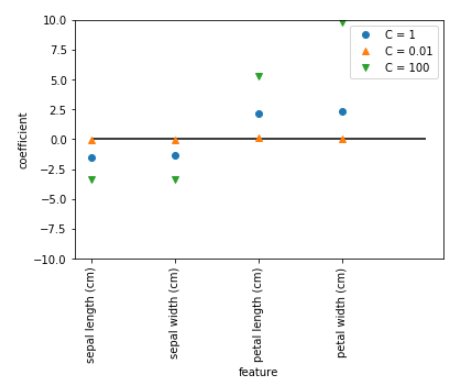
- 그래프 결과가 0에 가까울 수록 규제가 강함 -> C값이 작을 수록 훈련 덜 복잡해서 강한 규제 (C = 0.01)
- 강한 규제는 피쳐(특징) 수를 줄이는 것
- 이후 예측값과 원래 값을 확인하기 위해
result = [logreg.predict(X_test), y_test]


# 7 적합 결과(예측 결과) 보기
logreg_result = pd.DataFrame(result).T

logreg_result.columns = ["prediction", "observation"]

logreg_result['assessment'] = logreg_result['prediction'] == logreg_result['observation']
logreg_result.head()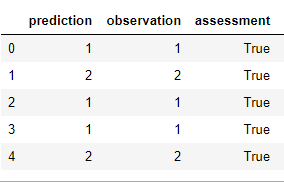
- 예측한 결과가 boolean 값으로 assessment 칼럼에 추가 된 것을 확인 할 수 있습니다.
'Code > 머신러닝 in Python' 카테고리의 다른 글
| [Python] Cross-validation(교차검증) (1) | 2019.08.30 |
|---|---|
| [Python] 분류분석 - SVM(Support Vector Machine) (1) | 2019.08.29 |
| [Python] LinearRegression(수치예측) - Lasso (0) | 2019.08.28 |
| [Python] LinearRegression(수치예측) - Ridge (0) | 2019.08.28 |
| [Python] LinearRegression(수치예측) (0) | 2019.08.28 |
[Python] LinearRegression(수치예측) - Lasso
Lasso
- 가중치의 절댓값의 합을 최소화하는 것을 추가적인 제약 조건임
- Ridge와 마찬가지로 모든 계수를 0으로 가깝게 만듦
- 규제 방식에 차이가 있음 --> L1 규제라 명명
- 어떤 계수 값은 0으로 산출 -> 완전 제외
- Lasso : boston 데이터 이용
# 0. 라이브러리 추가
from sklearn.datasets import load_boston
boston = load_boston()


# 1. 데이터 분리
X = boston.data
y = boston.target
X_train, X_test, y_train, y_test = train_test_split(X,y,test_size=0.3,random_state = 12)


# 2. Lasso modelling

## 2-1 default -> alpha = 1.0
lasso = Lasso().fit(X_train, y_train)
print("훈련 세트 점수 : {:.3f}".format(lasso.score(X_train,y_train)))
print("테스트 세트 점수 : {:.3f}".format(lasso.score(X_test,y_test)))
print('사용한 특성의 수 : {}'.format(np.sum(lasso.coef_ != 0)))
# 결과 : 훈련 세트 점수 : 0.678 테스트 세트 점수 : 0.586 사용한 특성의 수 : 10


## 2-2 alpha = 0.1
lasso01 = Lasso(alpha=0.1).fit(X_train, y_train)
print("훈련 세트 점수 : {:.3f}".format(lasso01.score(X_train,y_train)))
print("테스트 세트 점수 : {:.3f}".format(lasso01.score(X_test,y_test)))
print('사용한 특성의 수 : {}'.format(np.sum(lasso01.coef_ != 0)))
# 결과 : 훈련 세트 점수 : 0.736 테스트 세트 점수 : 0.693 사용한 특성의 수 : 11

## 2-3 alpha = 0.01
lasso001 = Lasso(alpha=0.01).fit(X_train, y_train)
print("훈련 세트 점수 : {:.3f}".format(lasso001.score(X_train,y_train)))
print("테스트 세트 점수 : {:.3f}".format(lasso001.score(X_test,y_test)))
print('사용한 특성의 수 : {}'.format(np.sum(lasso001.coef_ != 0)))
# 결과 : 훈련 세트 점수 : 0.748 테스트 세트 점수 : 0.708 사용한 특성의 수 : 13

## 2-4 alpha = 10
lasso10 = Lasso(alpha=10).fit(X_train, y_train)
print("훈련 세트 점수 : {:.3f}".format(lasso10.score(X_train,y_train)))
print("테스트 세트 점수 : {:.3f}".format(lasso10.score(X_test,y_test)))
print('사용한 특성의 수 : {}'.format(np.sum(lasso10.coef_ != 0)))
# 결과 : 훈련 세트 점수 : 0.557 테스트 세트 점수 : 0.464 사용한 특성의 수 : 5

# 그래프 확인
plt.plot(lasso001.coef_,"^", label="alpha=0.01")
plt.plot(lasso01.coef_,"^", label="alpha=0.1")
plt.plot(lasso.coef_,"^", label="alpha=1.0")
plt.plot(lasso10.coef_,"^", label="alpha=10")
plt.xlabel("coef list")
plt.ylabel("coefficient")
plt.hlines(0,0,len(lr.coef_))
plt.ylim(-15,5)
plt.legend()
plt.show()
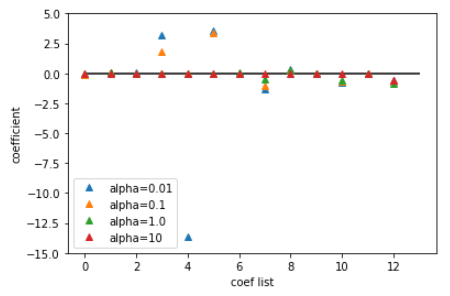
- alpha 값이 커질 수록 규제가 커지게 되며 복잡한 모델을 만든다.
- 위의 alpha값의 변화에 따라 점수를 확인하면 alpha가 작아질 수록 점수가 좋은 것을 확인 할 수있다.
이때, 값이 무한히 낮아지면 다시 점수가 나빠지는 과대적합이 발생 할 수도 있다.
- 그래프를 확인해보면 0의 값을 가진 것을 확인 할 수 있다. 이것이 Ridge와의 차이점이다.
'Code > 머신러닝 in Python' 카테고리의 다른 글
| [Python] 분류분석 - SVM(Support Vector Machine) (1) | 2019.08.29 |
|---|---|
| [Python] 분류분석 - logistic regression (0) | 2019.08.28 |
| [Python] LinearRegression(수치예측) - Ridge (0) | 2019.08.28 |
| [Python] LinearRegression(수치예측) (0) | 2019.08.28 |
| [Python] Gradient Boosting (0) | 2019.08.28 |
[Python] LinearRegression(수치예측) - Ridge
Ridge
- 일반 Linear Regression은 모델의 복잡도를 제어할 방법 없음(파라미터가 없기 때문)
- 릿지 회귀에서의 가중치 선택은 train data 에 대한 것 뿐만 아니라 추가 제약조건을 만족시키는 방향으로 진행
- 방법 : 가중치의 절대값을 가능한 작게 만듦 -> 모든 feature의 가중치를 0에 가깝게 만들어서 기울기를 최대한 작게 만든다 -> 규제
- Regularization : 모델이 과대적합 되지 않도록 강제로 제한 -> L2 규제
- 매개변수 조정 -> alpha 값을 높이면 규제를 강하게 하는 것 -> 계수를 더 0에 가깝게 만듦
앞에서 공부한 단순선형, 다중선형을 이어 Ridge 를 공부해보겠습니다.
낮은 train, test 점수를 보면서 더 높일 수 있는 방법이있지 않을까 생각이 들겁니다.
Ridge는 가중치를 조절하여 그래프의 기울기를 0으로 만들도록 하는 방식으로 모델에 있어 규제를 하는 방식입니다.
from sklearn.linear_model import Ridge


# 1. diabetes dataset loading 및 데이터 분할
diab = datasets.load_diabetes()
X = diab.data
y = diab.target
X_train , X_test , y_train, y_test = train_test_split(X , y , test_size=0.2,random_state=0)


# 2 object for modelling
rdg = Ridge()
rdg.fit(X_train, y_train)


# 3 훈련 결과 확인
print("훈련 세트 점수 : {:.3f}".format(rdg.score(X_train,y_train)))
print("테스트 세트 점수 : {:.3f}".format(rdg.score(X_test,y_test)))
# 결과 : 훈련 세트 점수 : 0.465 테스트 세트 점수 : 0.341

# 4 parameter tuning
rdg01 = Ridge(alpha=0.1)
# alpha 낮게 -> 규제 약하게 한다 -> 데이터에 더 많은 피팅 시켜라 -> 과대적합 방향으로 진행해라
# alpha 높게 -> 규제 강하게 한다 -> 모든 계수 값  0에 가깝게 -> 과소적합
rdg01.fit(X_train, y_train)


# 4-1 훈련 결과 확인
print("훈련 세트 점수 : {:.3f}".format(rdg01.score(X_train,y_train)))
print("테스트 세트 점수 : {:.3f}".format(rdg01.score(X_test,y_test)))
# 결과 : 훈련 세트 점수 : 0.548 테스트 세트 점수 : 0.342


# 5 parameter tuning
rdg02 = Ridge(alpha=0.01)
rdg02.fit(X_train, y_train)


# 5-1 훈련 결과 확인
print("훈련 세트 점수 : {:.3f}".format(rdg02.score(X_train,y_train)))
print("테스트 세트 점수 : {:.3f}".format(rdg02.score(X_test,y_test)))
# 결과 : 훈련 세트 점수 : 0.553 테스트 세트 점수 : 0.330


# 6 parameter tuning
rdg03 = Ridge(alpha=10)
rdg03.fit(X_train, y_train)


# 6-1 훈련 결과 확인
print("훈련 세트 점수 : {:.3f}".format(rdg03.score(X_train,y_train)))
print("테스트 세트 점수 : {:.3f}".format(rdg03.score(X_test,y_test)))
# 결과 : 훈련 세트 점수 : 0.176 테스트 세트 점수 : 0.141


# 그래프 확인
plt.plot(rdg.coef_,"^", label="alpha=0")
plt.plot(rdg01.coef_,"^", label="alpha=0.1")
plt.plot(rdg02.coef_,"^", label="alpha=0.01")
plt.plot(rdg03.coef_,"o", label="alpha=10")
plt.xlabel("coef list")
plt.ylabel("coefficient")
plt.hlines(0,0,len(lr.coef_))
plt.ylim(-500,500)
plt.legend()
plt.show()
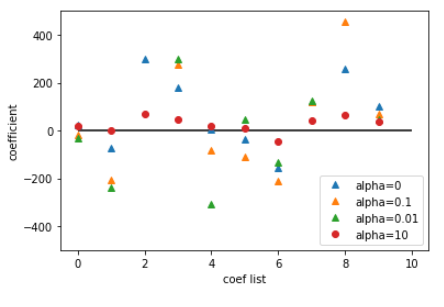
그래프를 해석하면, 가중치를 조절하기 위해 alpha를 조정하게 된다.
alpha는 클 수록 규제가 많이 들어가며, 복잡해진다. 또한, 커질수록 계수의 크기가 줄어들게 되며, 영향을 끼치는 변수가 줄어들게 됩니다.(alpha = 10을 보면 확인 가능)
'Code > 머신러닝 in Python' 카테고리의 다른 글
| [Python] 분류분석 - logistic regression (0) | 2019.08.28 |
|---|---|
| [Python] LinearRegression(수치예측) - Lasso (0) | 2019.08.28 |
| [Python] LinearRegression(수치예측) (0) | 2019.08.28 |
| [Python] Gradient Boosting (0) | 2019.08.28 |
| [Python] RandomForest 예제 (0) | 2019.08.27 |